
Huawei Modem Manager Mobile
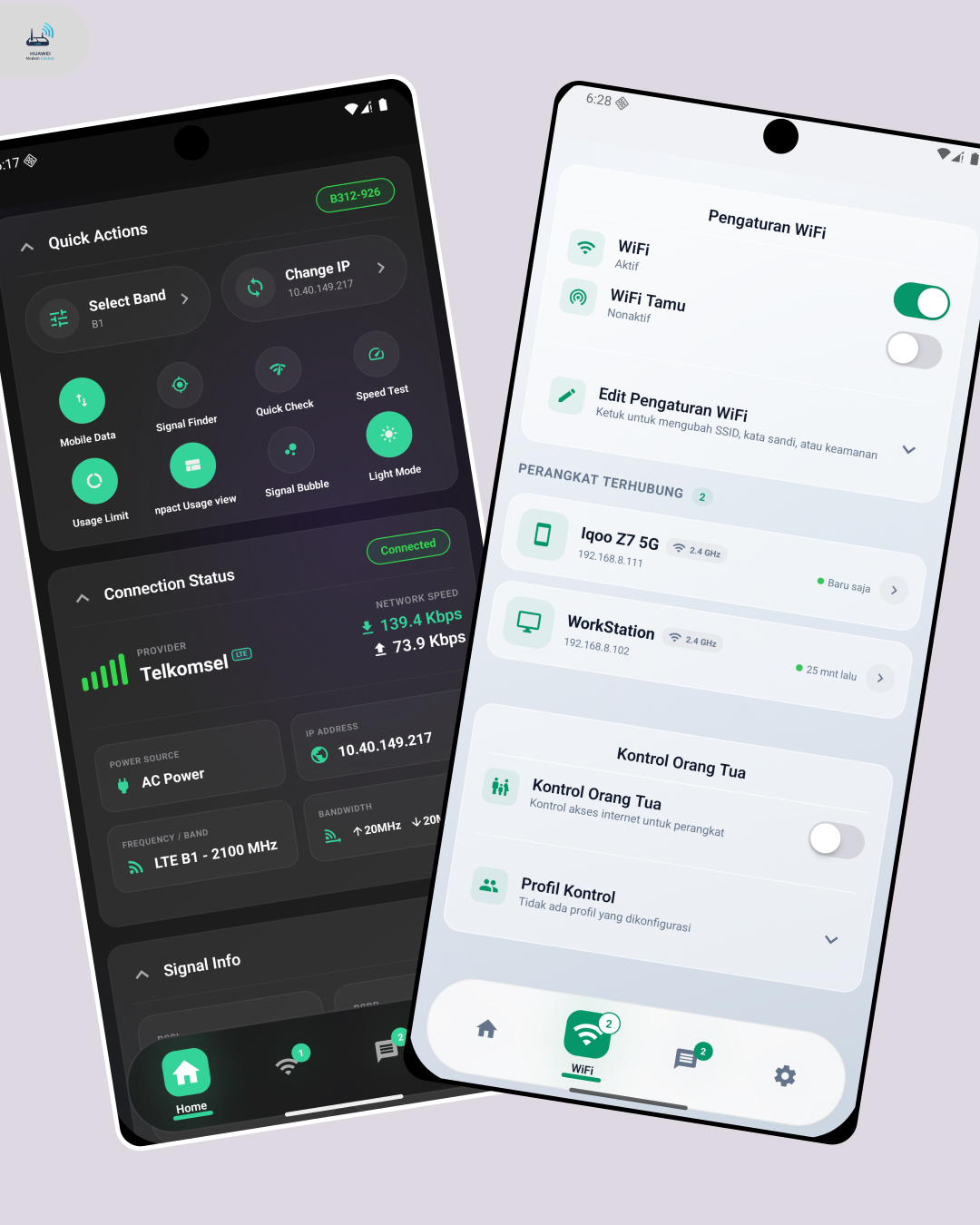
Huawei Manager Mobile
A mobile app for monitoring, controlling, and optimizing Huawei LTE modem connections.



Mobile Development · React Native · TypeScript · Networking · Open Source
Overview
Huawei Manager Mobile is an open-source mobile application I developed to make monitoring and managing Huawei LTE modems easier from a smartphone.
Instead of repeatedly opening the modem’s web administration interface, users can access signal information, network statistics, connected devices, SMS, Wi-Fi configuration, APN profiles, LTE band controls, and other modem settings from a dedicated mobile interface.
The application also provides cellular tower information, allowing users to identify the BTS currently connected to their modem and explore nearby BTS locations. This is particularly useful when evaluating LTE signal conditions, choosing a better modem position, or adjusting an external antenna.
The project supports Huawei LTE modem families such as B310, B311, B312, E5573, E5577, and other compatible devices.
The Problem
Huawei LTE modems provide many useful network and configuration parameters, but accessing them through the default web interface can be inconvenient on mobile devices.
Advanced information such as signal quality, LTE band, traffic statistics, connected clients, network configuration, and modem controls may also be distributed across multiple pages.
For users who regularly optimize their LTE connection, another challenge is understanding which cellular tower serves the modem and where alternative BTS sites are located nearby.
I built Huawei Manager Mobile to put these tools into a single mobile interface.
The Solution
Huawei Manager Mobile communicates with the modem through Huawei’s local modem APIs and presents the information through a mobile-first interface.
The application combines modem monitoring and configuration into one place, giving users quick access to both everyday controls and more advanced LTE information.
Users can monitor their connection in real time, manage network settings, inspect connected clients, work with SMS messages, control LTE bands, and access BTS information without relying on the modem’s original web dashboard.
Key Features
Real-Time Modem Monitoring
The dashboard provides real-time information about the modem and its active connection, including signal conditions, network status, traffic usage, and connection statistics.
It is designed to make important modem information readable at a glance rather than requiring users to navigate several administration pages.
Signal & LTE Information
Users can inspect cellular network and LTE signal information directly from the application.
This helps when testing modem placement, comparing network conditions, configuring an antenna, or diagnosing unstable connections.
Connected BTS
The application can display information related to the cellular BTS currently serving the modem.
This gives users additional context about their active LTE connection and helps them understand which cell site the modem is communicating with.
Nearby BTS Explorer
Huawei Manager Mobile can also help users explore BTS locations around their current area.
Combined with connected-cell and signal information, this feature can assist users when deciding where to place a modem or point an external LTE antenna.
LTE Band & Network Control
Users can access advanced modem configuration including:
- LTE band selection and band locking
- Network mode configuration
- Antenna mode
- Modem reboot controls
- Other supported cellular settings
Availability depends on the modem model and firmware.
Wi-Fi Management
The app provides tools for viewing devices connected to the modem and managing supported Wi-Fi settings.
This makes it easier to monitor clients on the network without opening the router’s browser-based administration panel.
SMS Management
For modem models that expose SMS functionality, users can:
- Read received messages
- Send SMS
- Delete existing messages
This is useful for SIM cards that receive operator notifications, OTP messages, quota information, or other network messages directly on the modem.
APN Management
Users can manage APN profiles used by the modem for mobile data connections.
This makes switching between operator configurations or custom APN profiles easier from a phone.
Ethernet Settings
Supported modem models can expose Ethernet configuration directly through the application.
Parental Control
Huawei Manager Mobile includes controls for managing or restricting devices connected to the modem where supported.
Android Home Screen Widgets
The application includes native Android widgets for monitoring modem information without opening the full application.
Users can quickly view information such as signal, traffic, and connection status directly from the Android home screen.
Push Notifications
Push notification support allows the application to deliver relevant application information and update notifications.
Multi-Language Interface
The interface currently supports:
- English
- Bahasa Indonesia
Light & Dark Mode
The application provides both light and dark themes with a consistent custom design system.
UI & Design
I designed the interface around a combination of visual patterns from macOS, iOS, and Android.
The UI uses glass-like surfaces, blur effects, rounded cards, layered layouts, native-style navigation, Material icons, smooth animations, and responsive components.
The goal was to present technical modem information without making the application feel like a traditional router administration panel.
Technical Architecture
The application follows a modular structure that separates presentation, modem communication, application state, and reusable business logic.
The codebase is organized around:
- Screens and routing for application navigation
- Reusable components for dashboard and management interfaces
- Custom hooks for feature-specific logic
- Services for Huawei modem API communication
- State stores for application-wide data
- Typed models for modem information
- Utilities for formatting, storage, networking, and error handling
- Native integrations for Android-specific functionality
This structure makes it easier to support additional modem models and extend individual features without coupling them directly to the UI.
Modem Communication
Huawei Manager Mobile communicates directly with compatible Huawei modem APIs over the user’s local Wi-Fi or LAN connection.
The service layer handles operations such as:
- Authentication and session management
- Modem information retrieval
- Signal and network status
- Wi-Fi configuration
- Connected-device information
- SMS operations
- Network settings
- Modem actions
Authentication data is stored using secure device storage where applicable.
Tech Stack
| Technology | Usage |
|---|---|
| React Native | Cross-platform mobile application |
| Expo SDK 54 | Application runtime and native tooling |
| TypeScript | Type-safe application development |
| Expo Router | File-based navigation |
| Zustand | Global state management |
| Axios | Huawei modem API communication |
| Expo Secure Store | Secure local credential storage |
| Expo Location | Location-based functionality |
| React Native Reanimated | UI animations |
| React Native SVG | Charts and visual indicators |
| Firebase Messaging | Push notification delivery |
| Expo Notifications | Notification handling |
| React Native Android Widget | Native Android home-screen widgets |
| Expo Crypto / CryptoJS | Authentication and cryptographic operations |
Engineering Highlights
One of the main technical challenges was dealing with differences between Huawei modem models and firmware versions.
Although many Huawei LTE modems expose similar APIs, authentication methods, endpoints, response formats, and supported features can differ between devices.
To address this, I separated modem communication from the interface and built the application around reusable services, hooks, typed models, and modem-specific handling.
Another major part of the project involved studying and working with Huawei modem Web UI behavior to understand the APIs used for authentication, status retrieval, and configuration.
The repository also includes dedicated development tools and documentation for debugging and reverse-engineering modem Web UI interactions.
Privacy
Huawei Manager Mobile follows a local-first approach for modem management.
Most modem communication takes place directly between the user’s smartphone and Huawei modem through the local Wi-Fi/LAN network.
The application does not need to send modem configuration data to a remote server to perform normal device-management operations.
The project is also open source, allowing its implementation to be inspected publicly.
Some optional functionality, such as push notifications, update services, advertising, or online BTS data, may require an internet connection.
Compatibility
The project is designed for several Huawei LTE modem families, including:
B310 · B311 · B312 · E5573 · E5577
It has been tested with the Huawei B312-929 (Orbit Star 2).
Because Huawei modem firmware differs between operators, regions, and models, individual features may have different levels of compatibility.
Development & Debugging
The project includes dedicated debugging tools for investigating modem API compatibility.
Users can enable an in-app debug mode and generate reports when a modem behaves differently from supported models.
Browser development tools can also be used to inspect the modem’s original Web UI and collect API information for compatibility testing.
This workflow helps make support for additional Huawei modem firmware easier to investigate and implement.
Open Source
Huawei Manager Mobile is publicly available on GitHub under the MIT License.
The repository includes source code, architecture documentation, API references, development guides, debugging documentation, release builds, and tools used during modem API research.
Community members can report compatibility issues, suggest features, fork the project, or contribute improvements through pull requests.
Project Status
Huawei Manager Mobile is actively developed and distributed through GitHub Releases.
Android builds are provided for different device architectures, including optimized 64-bit and 32-bit builds as well as a universal package.
Links
Source Code
https://github.com/alrescha79-cmd/huawei-manager-mobile
Releases
https://github.com/alrescha79-cmd/huawei-manager-mobile/releases
Website
https://hm.cakson.my.id
Huawei Manager Mobile is an independent open-source project and is not affiliated with or endorsed by Huawei Technologies.